{"templateId":"api_docs","sharedDataIds":{"apiDocsStore":"api-docs-reference/ai_shoes.yaml","sidebar":"sidebar-reference/sidebars.yaml"},"props":{"definitionId":"reference/ai_shoes.yaml","settings":{"baseUrlPath":"/reference/ai_shoes"},"disableAutoScroll":true,"seo":{"title":"AI Shoes Virtual Try-On","description":"YouCam API documentation by Perfect Corp. Learn how to use Skin analysis API, Virtual try-on API, Image editing API, and Video generative AI APIs.","siteUrl":"https://docs.perfectcorp.com","keywords":"AI Skin Analysis, AI Clothes, AI Hairstyle, AI Outfits","image":"/assets/favicon.cd6fa4d833b2a573b3c6dae68386b293da205b203402cb0c97b80bd2acc07ea2.8351e24f.png"},"dynamicMarkdocComponents":[],"metadata":{"type":"openapi","title":"AI Shoes Virtual Try-On","version":"","description":"# Overview\nStep into the future of shopping with our AR Shoes Virtual Try-On. Instantly see how your favourite styles look and fit right from your screen. Powered by cutting-edge AI technology, this experience delivers a perfect visual fit, helping you shop with confidence and reduce returns.\nExplore endless styles and colours from the comfort of home. Our high-fidelity AR simulation brings every detail to life so you can enjoy the thrill of an in-store experience anytime, anywhere. Try it today and find the perfect pair that matches your style.\n\n## Integration Guide\nThis guide walks you through:\n\n* **Endpoint:** `/s2s/v2.0/task/shoes`\n* **Authentication:** All requests require an `Authorization: Bearer YOUR_API_KEY`\n* **Workflow:**\n 1. **Prepare a selfie image:** Uploading an image or providing a valid image URL of yourself as the virtual try-on target.\n 1. **Prepare a shoes image:** Upload a shoe product image or a photo of a person wearing shoes.\n 1. **Select a style and a gender:** Select a preferred style and the gender you wish to visualize.\n 1. **Fire an AI task and Retrieve Task ID:** Capture the `task_id` from the response.\n 1. **Poll Status (`GET`):** Use the `task_id` to check the status of the task. Continue polling until `task_status` is `\"success\"` or `\"error\"`.\n\n---\n\n* Authentication\n- Include your API key in the request header using **Bearer Token**:\n```\nAuthorization: Bearer YOUR_API_KEY\n```\nYou can find your API Key at https://yce.makeupar.com/api-console/en/api-keys/.\n\n---\n\n* AI Shoes API Usage Guide\n\nThis guide explains how to upload images, prepare reference shoes, and create virtual try-on tasks using the AI Shoes API.\n\n***\n\n * Step 1. Prepare a Selfie Image\n\nYou can:\n* Upload a selfie image using the File API (`/s2s/v2.0/file`), or\n* Provide a valid image URL.\n\n * Step 1.1 Upload a File Using the File API\n\nUse the **File API** (`/s2s/v2.0/file`) to upload a target user image.\n\n**Image Requirements:**\n\n* Upload a selfie photo.\n* Ensure the photo clearly shows the upper body.\n* Avoid backgrounds with multiple people or distracting objects.\n\n**Example Request:**\n\n```bash\ncurl --request POST \\\n --url https://yce-api-01.makeupar.com/s2s/v2.0/file \\\n --header 'Authorization: Bearer YOUR_API_KEY' \\\n --header 'content-type: application/json' \\\n --data '{\n \"files\": [\n {\n \"content_type\": \"image/jpg\",\n \"file_name\": \"selfie_photo_01_3dbd1b6683.jpg\",\n \"file_size\": 547541\n }\n ]\n }'\n```\n\n***\n\n * Step 1.2. Retrieve File API Response\n\nThe response includes:\n\n* `file_id` for creating an AI task.\n* `requests.url` for uploading the actual image file.\n\n**Sample Response:**\n\n```json\n{\n \"status\": 200,\n \"data\": {\n \"files\": [\n {\n \"content_type\": \"image/jpg\",\n \"file_name\": \"selfie_photo_01_3dbd1b6683.jpg\",\n \"file_id\": \"SaGaqpDgKwFrVBgMpQMA3HY0LeqdT9/13W5TOD8/u/FfjK3xgCQ+hRt9MJXBFaud\",\n \"requests\": [\n {\n \"method\": \"PUT\",\n \"url\": \"https://yce-us.s3-accelerate.amazonaws.com/demo/ttl30/...signature...\",\n \"headers\": {\n \"Content-Length\": \"547541\",\n \"Content-Type\": \"image/jpg\"\n }\n }\n ]\n }\n ]\n }\n}\n```\n\n***\n\n * Step 1.3. Upload Image to Provided URL\n\nUse the `requests.url` from the File API response to upload the image:\n\n```bash\ncurl --location --request PUT 'https://yce-us.s3-accelerate.amazonaws.com/demo/ttl30/...signature...' \\\n --header 'Content-Type: image/jpg' \\\n --header 'Content-Length: 547541' \\\n --data-binary @'./selfie_photo_01_3dbd1b6683.jpg'\n```\n\n***\n\n * Step 2. Prepare a Reference Shoes Image\n\nYou can:\n\n* Upload a shoe image using the File API (`/s2s/v2.0/file`), or\n* Provide a valid image URL.\n\n**Supported Shoes Images:**\n\n* A shoe product image.\n* A photo of a person wearing shoes.\n\nRefer to **[File Specs and Errors](#section/overview/File-Specs-and-Errors)** for detailed specifications.\n\n***\n\n * Step 3. Create an AI Task\n\nSelect a preferred style and the gender you wish to visualize.\nUse the **AI Task API** (`/s2s/v2.0/task/shoes`) to create a virtual try-on task.\n\n**Parameters:**\n\n* For the user image: `src_file_id` or `src_file_url`.\n* For the shoes image: `ref_file_id`, or `ref_file_url`.\n\n**Example Request:**\n\n```bash\ncurl --request POST \\\n --url https://yce-api-01.makeupar.com/s2s/v2.0/task/shoes \\\n --header 'Authorization: Bearer YOUR_API_KEY' \\\n --header 'content-type: application/json' \\\n --data '{\n \"src_file_url\": \"https://example.com/selfie.jpg\",\n \"ref_file_url\": \"https://example.com/accessory.jpg\",\n \"gender\": \"female\",\n \"style\": \"random\"\n}'\n```\n\n**Sample Response:**\n\n```json\n{\n \"status\": 200,\n \"data\": {\n \"task_id\": \"SaGaqpDgKwFrVBgMpQMA3HY0LeqdT9_13W5TOD8_u_GPi6NqQ3dhlmN-6ntFwhzT\"\n }\n}\n```\n\n***\n\n * Step 4. Poll for Task Result\n\nUse the task ID to check the status:\n\n```bash\ncurl --request GET \\\n --url https://yce-api-01.makeupar.com/s2s/v2.0/task/shoes/SaGaqpDgKwFrVBgMpQMA3HY0LeqdT9_13W5TOD8_u_GPi6NqQ3dhlmN-6ntFwhzT \\\n --header 'Authorization: Bearer YOUR_API_KEY' \\\n --header 'content-type: application/json'\n```\n\n***\n\n * Step 5. Retrieve Result\n\nA successful response includes a download URL for the result image:\n\n```json\n{\n \"status\": 200,\n \"data\": {\n \"error\": null,\n \"results\": {\n \"url\": \"https://yce-us.s3-accelerate.amazonaws.com/demo/ttl30/...signature...\"\n },\n \"task_status\": \"success\"\n }\n}\n```\n\nInvalid API Key error response:\n\n```json\n{\n \"status\": 401,\n \"error\": \"Unauthorized\",\n \"error_code\": \"InvalidAccessToken\"\n}\n```\n\n---\n\n## File Specs & Errors\n\n* AI Shoes Virtual Try-On Specification\n\n * Image Requirements\n\n| Type | Minimum Resolution | Notes |\n| ------ | ------------------ | ----- |\n| Selfie | 512 × 512 | Face visible, head-to-chest preferred |\n| Shoes | 512 × 512 (product)
800 × 800 (worn) | Clear, unobstructed shoes view |\n\n**Supported Shoes Image**\n\n* Product Image Requirements\n * Minimum resolution: 512 × 512 pixels\n * Only one product per image\n * The product should cover more than 25% of the image height\n\n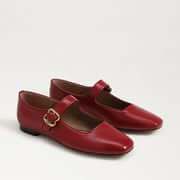\n\n* Worn Image Requirements\n * Minimum resolution: 800 × 800 pixels\n * Single Item Requirement: The model must wear exactly one item. Multiple items or accessories are not permitted.\n * Coverage Ratio: The worn item must occupy more than 20% of the total image height. This ensures the item is clearly visible and prominent within the frame.\n\n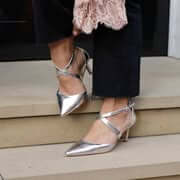\n\n**Supported Selfie View**\n\n* Recommended image resolution: at least 512 × 512 pixels.\n* Recommended face coverage: more than 15% of the image height.\n* Single Subject Requirement: The image must contain exactly one human subject. No additional people or partial figures are allowed.\n* Face Visibility: The subject's face must be fully visible without obstruction. Hair, accessories, or objects should not cover key facial features.\n* Framing: The image must include at least a head shot, covering the area from the top of the head to the chest. A half-body shot (head to waist) is preferred for optimal analysis.\n\n\n\n**Try-on Styles**\n\n* There are five predefined styles for generating the virtual try-on output: \"style_minimalist\" \"style_bohemian\" \"style_cottagecore\" \"style_french_elegance\" and \"style_retro_fashion\". You can specify this style parameter when creating an AI task or allow the system to select a style at random by default.\n\n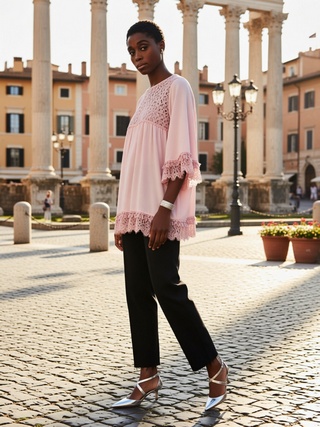\n\n---\n\n* Supported Formats & Dimensions\n\n| AI Feature | Supported Dimensions | Supported File Size | Supported Formats |\n| ---- | ---- | ---- | ---- |\n| AI Shoes Virtual Try-On | Input: long side <= 4096
Output: 1008 x 1344 | < 10MB | jpg/jpeg/png/heic |\n\n* Error Codes\n\n| Error Code | Description |\n| ------------------------------ | -------------------------------------------- |\n| error\\_download\\_image | Failed to download source or reference image |\n| error\\_inference | Inference pipeline error |\n| error\\_no\\_face | No face detected in source image |\n| error\\_nsfw\\_content\\_detected | NSFW content detected in result |\n| exceed\\_max\\_filesize | File size exceeds 10 MB |\n| invalid\\_parameter | Invalid gender or style value |\n| unknown\\_internal\\_error | Other internal errors |\n\n\n* Environment & Dependency\n\n| Sample Code Language / Tool | Recommended Runtime Versions |\n|---|---|\n| cURL | - bash >= 3.2 - curl >= 7.58 (modern TLS/HTTP support) - jquery >= 1.6 (robust JSON parsing) |\n| Node.js (JavaScript) | Node >= 18 (for global fetch) |\n| JavaScript | - Chrome / Edge >= 80 - Firefox >= 74 - Safari >= 13.1 |\n| PHP | PHP >= 7.4 (for modern TLS/compat), ext-curl (recommended) or allow_url_fopen=On + ext-openssl, ext-json |\n| Python | Python >= 3.10 (for f-strings), requests >= 2.20.0 |\n| Java | Java 11+ (for HttpClient), Jackson Databind >= 2.12.0 |\n\n---\n\n## Unit Consumption\n\n| AI Feature | Unit Consumed |\n|---|---|\n| AI Shoes Virtual Try-On V2.0 | 2 |\n\n---\n"},"compilationErrors":[],"markdown":{"partials":{},"variables":{"rbac":{"teams":["anonymous"]},"user":{},"remoteAddr":{"hostname":"docs.perfectcorp.com","port":4000,"ipAddress":"216.73.216.26"},"lang":"default_locale","env":{"PUBLIC_REDOCLY_BRANCH_NAME":"master"}}},"pagePropGetterError":{"message":"","name":""}},"slug":"/reference/ai_shoes","userData":{"isAuthenticated":false,"teams":["anonymous"]},"isPublic":true}