The Model Context Protocol (MCP) is a lightweight, JSON‑based wrapper that enables client applications (e.g., Cursor, Copilot in VS Code, Claude for Desktop) to invoke the YouCam AI services without dealing with low‑level HTTP details.
Key benefits: By adding a single entry to MCP configuration JSON file and supplying your YouCam API key, any MCP‑compatible client (Cursor, Copilot in VS Code, Claude for Desktop) can instantly access the full suite of YouCam AI services - skin analysis, cloth virtual try‑on, hair styling, fashion rendering, and more functions. The client abstracts request formatting, authentication handling, and asynchronous polling, allowing developers to focus on workflow integration rather than low‑level API mechanics.
- An MCP‑compatible client installed (Claude Desktop, Codex, Cursor, Copilot in VS Code, etc.).
- Network access to the YouCam MCP servers, there are 3 categories:
https://mcp-api-01.makeupar.com/mcp/beautyhttps://mcp-api-01.makeupar.com/mcp/fashionhttps://mcp-api-01.makeupar.com/mcp/creators
- A valid YouCam API key (see next Section).
The client itself already implements request/response serialization and polling logic; no additional code is required from the developer.
- Navigate to the API‑key console: https://yce.perfectcorp.com/api-console/en/api-keys/
- Create a new key or copy an existing one.
- Store the key securely (environment variable, secret manager, etc.).
Example environment variable (adjust for your deployment):
YOUR_API_KEY=your‑api‑key
MCP clients read a JSON configuration file named mcp.json. Add an entry for the YouCam MCP server as shown below:
- YouCam for Beauty & Skin Care
{
  "mcpServers": {
    "youcam-beauty": {
      "url": "https://mcp-api-01.makeupar.com/mcp/beauty",
      "headers": {
        "Authorization": "Bearer YOUR_API_KEY"
      }
    }
  }
}- YouCam for Fashion & Retail
{
  "mcpServers": {
    "youcam-fashion": {
      "url": "https://mcp-api-01.makeupar.com/mcp/fashion",
      "headers": {
        "Authorization": "Bearer YOUR_API_KEY"
      }
    }
  }
}- YouCam for Creators
{
  "mcpServers": {
    "youcam-creators": {
      "url": "https://mcp-api-01.makeupar.com/mcp/creators",
      "headers": {
        "Authorization": "Bearer YOUR_API_KEY"
      }
    }
  }
}
Configuration steps
| Step | Action |
|---|---|
| 1. Setup MCP configuration JSON file | Put the file in the root of your project or in the client‑specific configuration directory (refer to each client’s documentation). |
| 2. Replace placeholder | Substitute YOUR_API_KEY with the value obtained in Section 2, or reference an environment variable (${YOUR_API_KEY}) if supported by the client. |
| 3. Verify connectivity | Open the client UI and confirm that “YouCam API MCP” appears as a selectable service. |
The configuration is static; any change to the key requires a client reload.
Integration with Popular MCP‑Aware Clients
Download and install Node.js and npm.
Settings → Developer → Edit config → open claude_desktop_config.json file
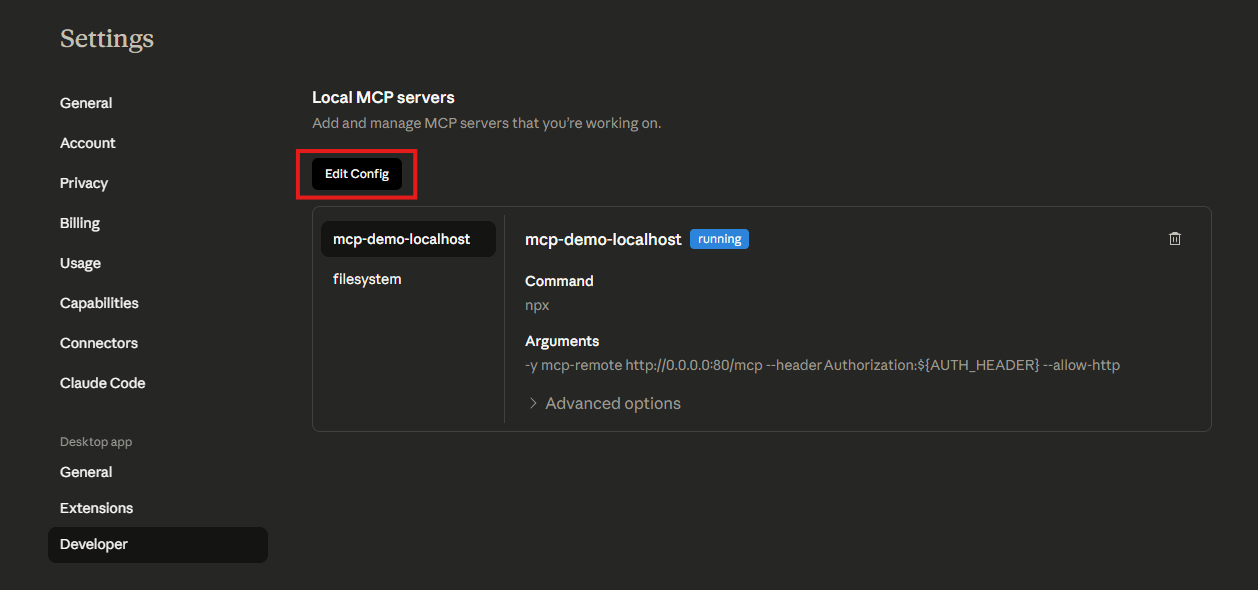
update the
mcpServerssectionreplace the
YOUR_API_KEYpart with your actual api key
{
  "mcpServers": {
    "youcam-beauty": {
      "command": "npx",
      "args": [
        "-y",
        "mcp-remote",
        "https://mcp-api-01.makeupar.com/mcp/beauty",
        "--header",
        "Authorization:${AUTH_HEADER}"
      ],
      "env": {
        "AUTH_HEADER": "Bearer YOUR_API_KEY"
      }
    }
  }
}- File → Exit to restart claude desktop app
Open Settings → Tools & MCP → Add Custom MCP
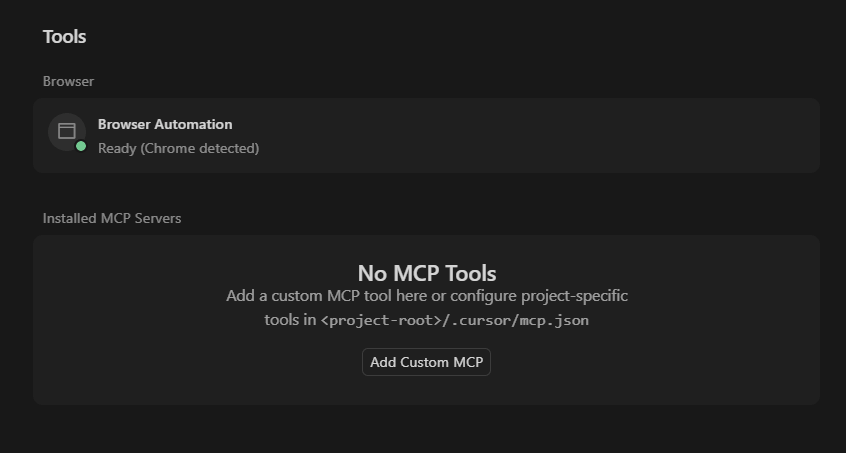
Add settings into mcp.json file
{
  "mcpServers": {
    "youcam-beauty": {
      "url": "https://mcp-api-01.makeupar.com/mcp/beauty",
      "type": "http",
      "headers": {
        "Authorization": "Bearer YOUR_API_KEY"
      }
    }
  }
}
Navigate to Cursor Settings → Tools & MCP
Enable or Disable the desired tools in 'Installed MCP Servers' section
Copilot in VS Code option 1:
> MCP: Add Server
choose
HTTP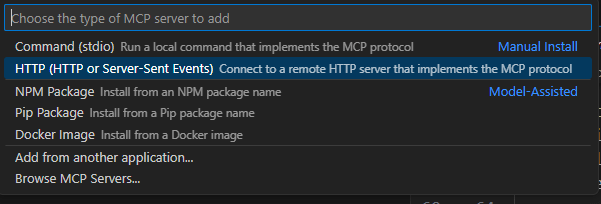
enter the server url
name the mcp server
header setting: fill in the api token
Copilot in VS Code option 2:
> MCP: Open User Configuration
Update the youcam-beauty setting to
mcp.json
{
    "servers": {
        "youcam-beauty": {
            "url": "https://mcp-api-01.makeupar.com/mcp/beauty",
            "type": "http",
            "headers": {
                "Authorization": "Bearer YOUR_API_KEY"
            }
        }
    }
}YouCam for Beauty & Skin Care includes the following tools for makeup, skincare analysis, facial enhancement, and appearance transformation:
- YouCam for Beauty & Skin Care
{
  "mcpServers": {
    "youcam-beauty": {
      "url": "https://mcp-api-01.makeupar.com/mcp/beauty",
      "headers": {
        "Authorization": "Bearer YOUR_API_KEY"
      }
    }
  }
}| Tool Name | Description |
|---|---|
AI_Skin_Analysis | Evaluates skin concerns like wrinkles, pores, acne, oiliness, dark circles, texture, and hydration (HD & SD modes). |
AI_Skin_simulation | Visualizes before/after treatment progress for up to 10 skin concerns (radiance, acne, spots, etc.). |
AI_Facial_Color_Tones_Analyzer | Detects facial skin tone, eye color, eyebrow color, lip color, and hair color. |
AI_Aging_Simulation | Generates a series of photos showing how you look from youth to old age based on a single selfie. |
AI_Face_Attributes_and_Ratio_Analyzer | Analyzes facial structure, features (eyes, brows, lips, nose, cheekbones), and golden ratio proportions. |
AI_Face_Lift | AI-powered facial refinement for eye bags, cheeks, forehead, face shape, and mouth with natural results. |
AI_Face_Reshape | Pixel-perfect control to reshape eyes, nose, lips, jawline, chin, and overall face structure. |
AI_Fitzpatrick_Skin_Type_Analysis | Classifies skin into 6 Fitzpatrick types based on melanin levels and UV response. |
AI_Smile | Transforms neutral or sad expressions into natural-looking smiles (with or without teeth). |
AI_Teeth_Whitening | Automatically detects and brightens teeth with adjustable whitening intensity. |
| Tool Name | Description |
|---|---|
AI_Hair_Style_Virtual_Try_On | Try on a wide variety of hairstyles (curly, long, buzz cut, etc.) using templates or reference images. |
AI_Hair_Type_Detection | Analyzes hair texture, thickness, and curl pattern across 9 clear types. |
AI_Hair_Volume_Virtual_Try_On | Instantly add natural volume to fine or thinning hair in photos. |
AI_Bangs_Filter_Virtual_Try_On | Virtually try on different bangs styles to see what suits your face best. |
AI_Hair_Color_Virtual_Try_On | Change hair color using presets or custom palettes (full or ombre modes). |
AI_Wavy_Hair_Virtual_Try_On | Experiment with wavy, curly, or ringlet hairstyles virtually. |
AI_Hair_Density_Detection | Assesses and classifies hair density into 4 levels based on scalp visibility. |
AI_Hair_Extension_Virtual_Try_On | Virtually try on long to extra-long hair extensions with natural blending. |
AI_Hair_Frizziness_Detection | Analyzes hair frizz levels using front, left, and right view photos. |
AI_Hair_Length_Detection | Measures and categorizes hair length into 5 distinct stages. |
| Tool Name | Description |
|---|---|
AI_Abs_Filter | Adds realistic six-pack or vest-line abdominal definition to full/upper-body photos. |
AI_Body_Reshape | Slims, reshapes, and enhances body proportions (waist, arms, thighs, chest, height, etc.). |
AI_Breast_Augmentation_Simulator | Non-invasive AI visualization for bust contour enhancement with adjustable intensity. |
| Tool Name | Description |
|---|---|
AI_Makeup_Virtual_Try_On | Hyper-realistic virtual makeover with precise control over foundation, blush, eyeshadow, lips, etc. |
AI_Makeup_Transfer | Transfers a complete makeup look from a reference photo onto your target selfie. |
AI_Nail_Virtual_Try_On | Virtually try on nail polish colors, textures, designs, or press-on nails. |
AI_Eye_Color_Lens_Virtual_Try_On | Realistic contact lens/eye color virtual simulation with opacity & blending controls. |
AI_Look_Virtual_Try_On | Applies professionally designed beauty/facial looks instantly via templates. |
AI_Beard_Style_Generator | Virtually try on different men's beard styles (stubble, full, goatee, mustache, etc.). |
| Tool Name | Description |
|---|---|
*_Templates | Lists predefined templates for bangs, beards, hair extensions, hairstyles, hair volume, and looks. |
*_Detection | Runs detection/preprocessing tasks required before certain reshape/lift/whitening APIs. |
File_Upload | Interactive drag-and-drop widget for uploading images/videos directly from the browser. |
Get_Running_Task_Status | Checks the status and retrieves results of previously initiated AI processing tasks. |
Get_Upload_API_Info | Returns upload API endpoints and example requests/responses for specific task types. |
Get_Feature_Cost | Checks unit consumption/cost pricing for each YouCam API feature. |
The YouCam for Fashion & Retail includes the following API tools for fashion, accessory, and styling applications:
- YouCam for Fashion & Retail
{
  "mcpServers": {
    "youcam-fashion": {
      "url": "https://mcp-api-01.makeupar.com/mcp/fashion",
      "headers": {
        "Authorization": "Bearer YOUR_API_KEY"
      }
    }
  }
}| Tool Name | Description |
|---|---|
AI_Clothes_Virtual_Try_On | Virtual fitting room that overlays outfits onto your photo. Supports full body, upper/lower body, shoes, outerwear, or auto-detection. |
AI_Fabric_Virtual_Try_On | Applies realistic fabric textures and prints to images using predefined templates (e.g., silk, bold patterns). |
AI_Fabric_Virtual_Try_On_Templates | Lists all available predefined fabric texture/style templates for use with the Fabric VTO tool. |
| Tool Name | Description |
|---|---|
AI_Shoes_Virtual_Try_On | High-fidelity AR shoe try-on that visualizes fit, style, and color on your feet. Requires explicit gender parameter. |
| Tool Name | Description |
|---|---|
AI_Hat_Virtual_Try_On | Hyper-realistic AR try-on for hats, caps, and headbands with precise alignment and style controls. Requires explicit gender parameter. |
AI_Scarf_Virtual_Try_On | Simulates realistic scarf draping, folds, and pattern flow over outfits. Requires explicit gender parameter. |
| Tool Name | Description |
|---|---|
AI_Bracelet_Virtual_Try_On | AI-powered bracelet try-on from a single 2D image with adjustable placement, shadow, and lighting. |
AI_Earrings_Virtual_Try_On | Realistic earring & virtual piercing simulator with dynamic lighting, occlusion handling, and ear-side selection. |
AI_Necklace_Virtual_Try_On | AR necklace try-on featuring precise neck/clavicle tracking for luxurious, physically accurate placement. |
AI_Ring_Virtual_Try_On | Virtual ring/engagement ring try-on with finger selection, knuckle positioning, and realistic shadow/lighting. |
AI_Watch_Virtual_Try_On | AR watch visualization with strap alignment, case edge detection, and wrist placement controls. |
AI_Bag_Virtual_Try_On | Luxury handbag/bag AR try-on that visualizes carry style, strap length, and outfit pairing. Requires explicit gender parameter. |
| Tool Name | Description |
|---|---|
File_Upload | Interactive drag-and-drop widget for uploading images/videos directly from the browser. |
Get_Running_Task_Status | Checks the status and retrieves results of previously initiated AI processing tasks. |
Get_Upload_API_Info | Returns upload API endpoints and example requests/responses for specific task types. |
Get_Feature_Cost | Checks unit consumption/cost pricing for each YouCam API feature. |
The following AI-powered tools available in YouCam for Creators are grouped by their primary functionality:
- YouCam for Creators
{
  "mcpServers": {
    "youcam-creators": {
      "url": "https://mcp-api-01.makeupar.com/mcp/creators",
      "headers": {
        "Authorization": "Bearer YOUR_API_KEY"
      }
    }
  }
}| Tool Name | Description |
|---|---|
AI_Image_Generator_Text_to_Image | Generates high-quality images from text prompts with style/size controls and smart prompt rewriting. |
AI_Image_Generator_Image_to_Image | Transforms or edits existing images using text instructions + up to 3 reference images for pose/style guidance. |
AI_Photo_Colorize | Instantly colorizes black & white or faded photos into 4 unique vibrant versions (warm to cool tones). |
AI_Color_Correction | Auto-adjusts saturation, temperature, hue, exposure, and skin tones; outputs 4 professionally graded variations. |
AI_Photo_Enhance | Upscales resolution (1x/2x/4x), fixes motion blur, removes pixelation, and sharpens facial/details clarity. |
AI_Photo_Lighting | AI-powered brightening tool that recovers shadows, balances exposure, and enhances low-light photos naturally. |
AI_Image_Extender | Context-aware outpainting that seamlessly expands images to any custom ratio while preserving style & quality. |
| Tool Name | Description |
|---|---|
AI_Photo_Background_Removal | High-precision AI subject isolation with clean edges; supports people, products, animals, cars, etc. |
AI_Photo_Background_Blur | Applies natural bokeh/background blur to make subjects pop; adjustable intensity (0–100). |
AI_Photo_Background_Change & _Templates | Replaces backgrounds using custom text prompts or predefined scenic templates after subject isolation. |
AI_Video_Background_Replace | Seamlessly swaps video backgrounds with reference images/videos; supports crop/stretch fitting modes. |
| Tool Name | Description |
|---|---|
AI_Avatar_Generator & _Templates | Image-to-image avatar creation that learns facial traits and applies artistic/stylized templates. |
AI_Studio_Generator & _Templates | Transforms casual selfies into studio-quality professional portraits with optimized lighting & composition. |
AI_Headshot_Generator & _Templates | Generates polished LinkedIn/business/model headshots from standard photos using AI styling templates. |
| Tool Name | Description |
|---|---|
AI_Face_Swap & AI_Face_Swap_Face_Detection | Hyper-realistic photo face swapping supporting multiple faces, custom mapping, and skip logic. |
AI_Video_Face_Swap | AI-powered single-face video swap with adaptive lighting, expression tracking, and skin tone blending. |
AI_Object_Removal_Pro | Precision removal of unwanted objects/people using grayscale masks; preserves intricate background details. |
AI_Video_Object_Removal | Frame-consistent removal of distracting elements from videos using a single reference mask frame. |
AI_Replace | AI inpainting that removes masked areas and generates new objects/textures based on custom prompts. |
| Tool Name | Description |
|---|---|
AI_Video_Generator_Text_to_Video | Creates dynamic videos from text prompts with resolution, aspect ratio, duration, and negative prompt controls. |
AI_Video_Generator_Image_to_Video | Animates still images into realistic short videos using motion prompts & template optimization. |
AI_Video_Enhancer | Auto-fixes blur, sharpens edges, corrects exposure/brightness, reduces noise, and upscales low-res footage to HD. |
AI_Video_Style_Transfer & _Templates | Applies cinematic/AI filters (pop art, retro, anime, etc.) frame-by-frame for consistent stylized video output. |
| Tool Name | Description |
|---|---|
File_Upload | Interactive drag-and-drop widget for uploading images/videos directly from the browser. |
Get_Running_Task_Status | Checks the status and retrieves results of previously initiated AI processing tasks. |
Get_Upload_API_Info | Returns upload API endpoints and example requests/responses for specific task types. |
Get_Feature_Cost | Checks unit consumption/cost pricing for each YouCam API feature. |